Oct 23, 2026 · 6 min read
Find What Broke on Your Site, and What Changed Since Last Time
Site Audit in 1MarketingTool 1.6.0 crawls up to 10,000 pages on your own machine, runs 156 checks, names the one link behind hundreds of errors, and shows what changed since your last crawl.
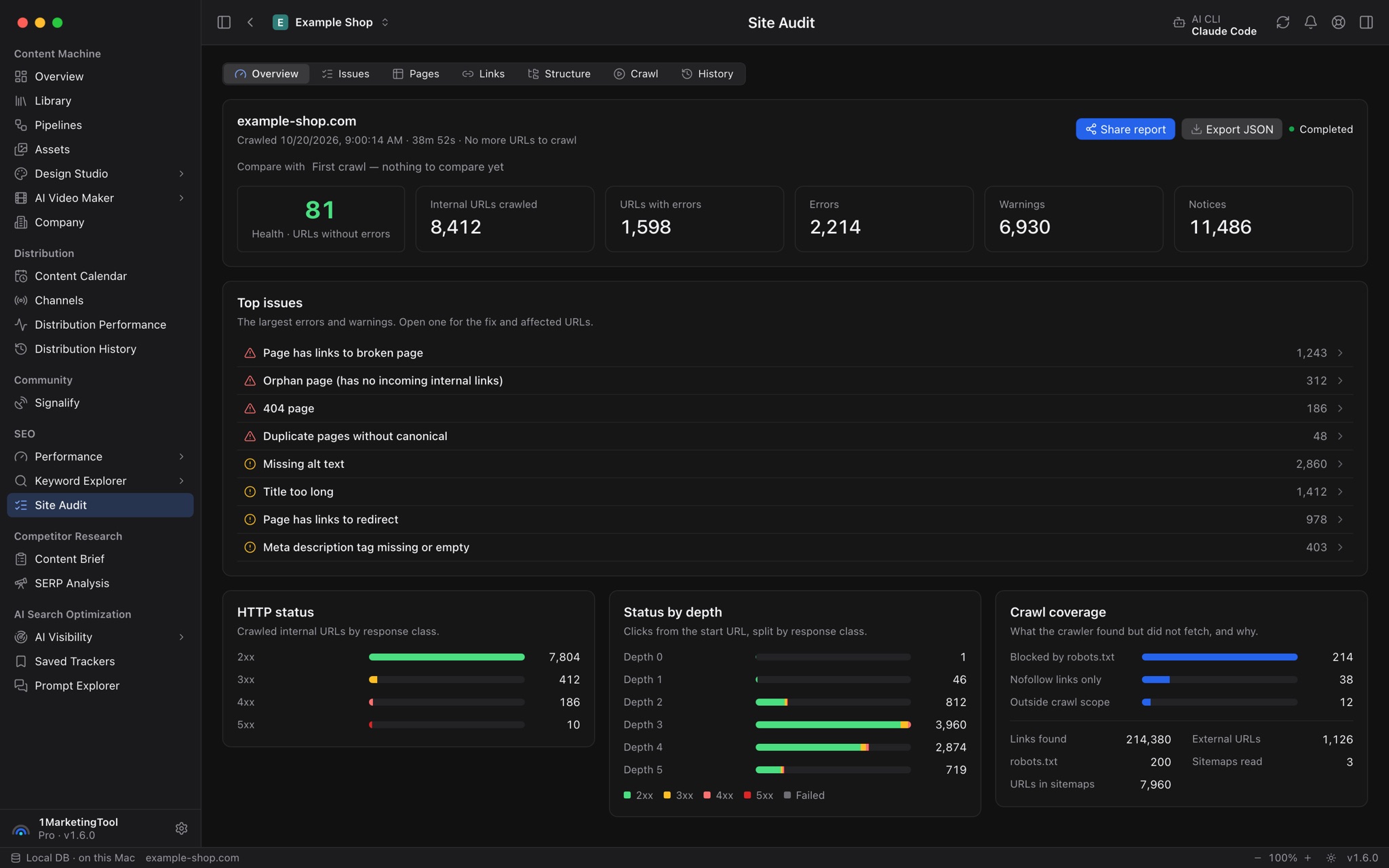
You shipped a redesign on Friday. On Tuesday, Search Console sends a coverage email, and by the time you open it you already know the shape of the week: export a crawl, sort a spreadsheet of a few hundred broken-link rows, and slowly work out that almost all of them come from one footer link that points at a docs subdomain you retired months ago.
The crawl itself was never the hard part. The hard part is everything around it: knowing which of 400 rows share one cause, noticing what changed since last month, remembering to crawl again after the fix, and doing all of it without paying a monthly fee per site for a cloud crawler that keeps your data on its servers.
What changed
Site Audit in 1MarketingTool 1.6.0 is a full technical SEO auditor that runs on your own machine. A crawl covers up to 10,000 pages, up from 500, records every URL, link, redirect, image, script and stylesheet, and runs 156 checks across indexability, links, redirects, content, sitemaps, robots.txt, hreflang, social tags, duplicates, structured data, Core Web Vitals and AI discoverability.
Now you can find the one link behind hundreds of errors, see what got worse since the last crawl, and hand the fix to an AI agent, without exporting a single spreadsheet.
How it works in practice
Crawl the site you actually have
Open SEO → Site Audit, go to the Crawl tab, check the start URL and pick how many pages to crawl. The crawler reads robots.txt and your sitemaps first, then follows internal links.
Real sites have pages that links do not reach. Under Advanced you can add your own start URLs, such as campaign landing pages, or start from every page Search Console shows in search. That second option is how you find orphan pages and old URLs Google still knows about.
Staging sites behind a password are covered too. Save the sign-in once per project. The password goes into your system keychain and is only ever sent to that site, over HTTPS.
If a crawl stops early because you closed the laptop or hit Cancel, Resume crawl picks it up from where it ended.
Read one issue instead of 400 rows
The Overview tab shows health: the share of crawled URLs without errors. Because it counts URLs, not a weighted score, fixing one broken template moves it right away.
The Issues tab lists errors, warnings and notices. Each issue explains why it matters and how to fix it, and lists every affected URL. When one link or template is behind hundreds of pages, such as that dead footer link or a docs subdomain that no longer exists, the issue names that shared root cause. You fix one thing, not 400.
Some checks look past classic SEO. Site Audit flags pages blocked from AI search bots, an inconsistent AI training bot policy, a missing llms.txt, and main content that only appears after JavaScript runs, which matters if you want AI answers to cite you.
See what changed since the last crawl
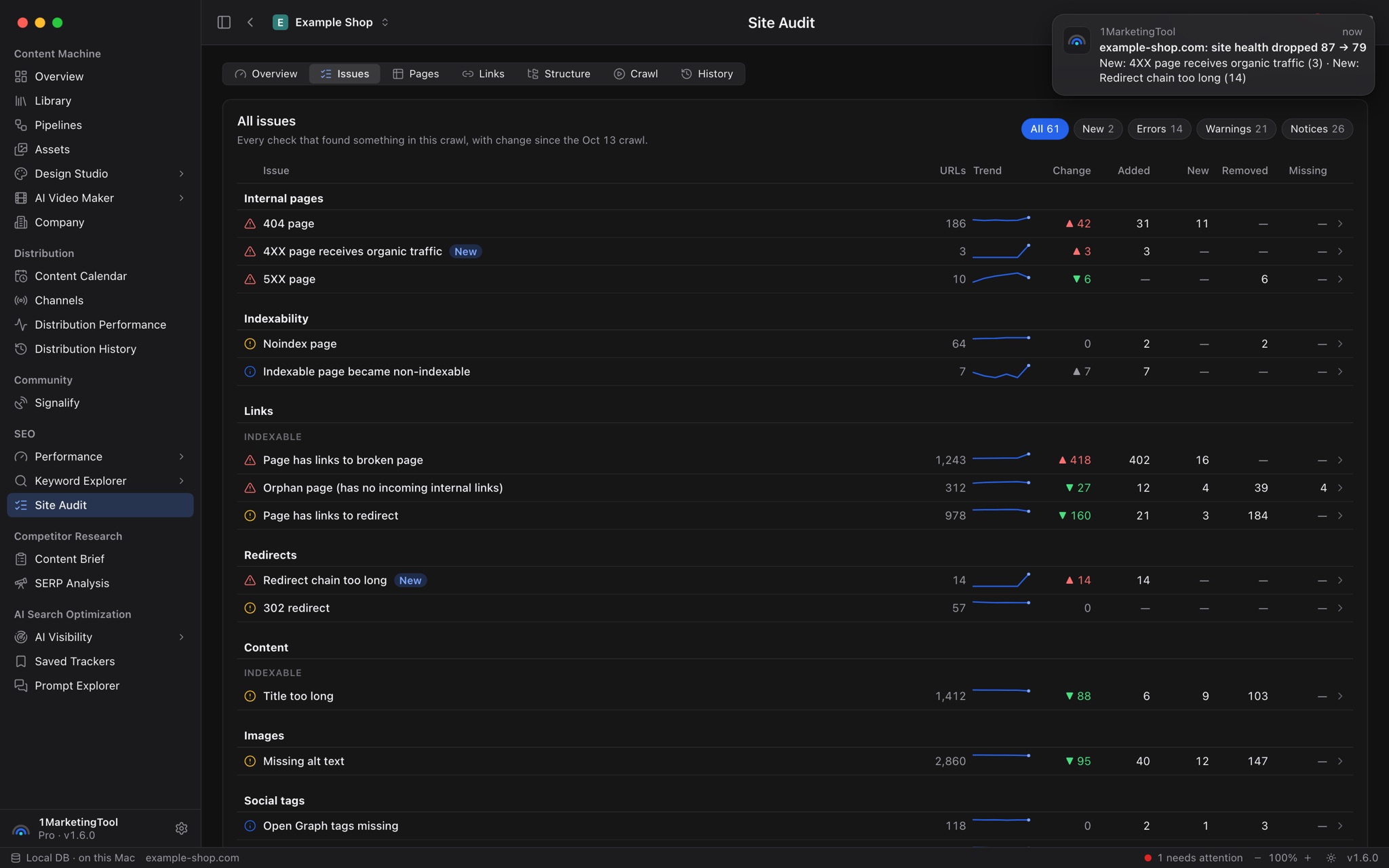
Pick an earlier crawl in Compare with, and every issue shows four numbers: URLs that were Added (existing pages that now have the issue), New (pages new to this crawl), Removed (fixed) and Missing (no longer found). A trend line shows how each issue moved across crawls.
Some checks only exist between crawls: Indexable page became non-indexable, Canonical URL changed, Robots.txt changed, No. of URLs in sitemap decreased. These are the quiet regressions that cost traffic weeks before anyone notices.
Under Schedule & automation, set crawls to repeat daily, weekly or monthly. Turn on an alert for when health drops or a new error appears, and let the app auto-submit new and changed pages to IndexNow after each crawl.
Ask your own questions of the crawl
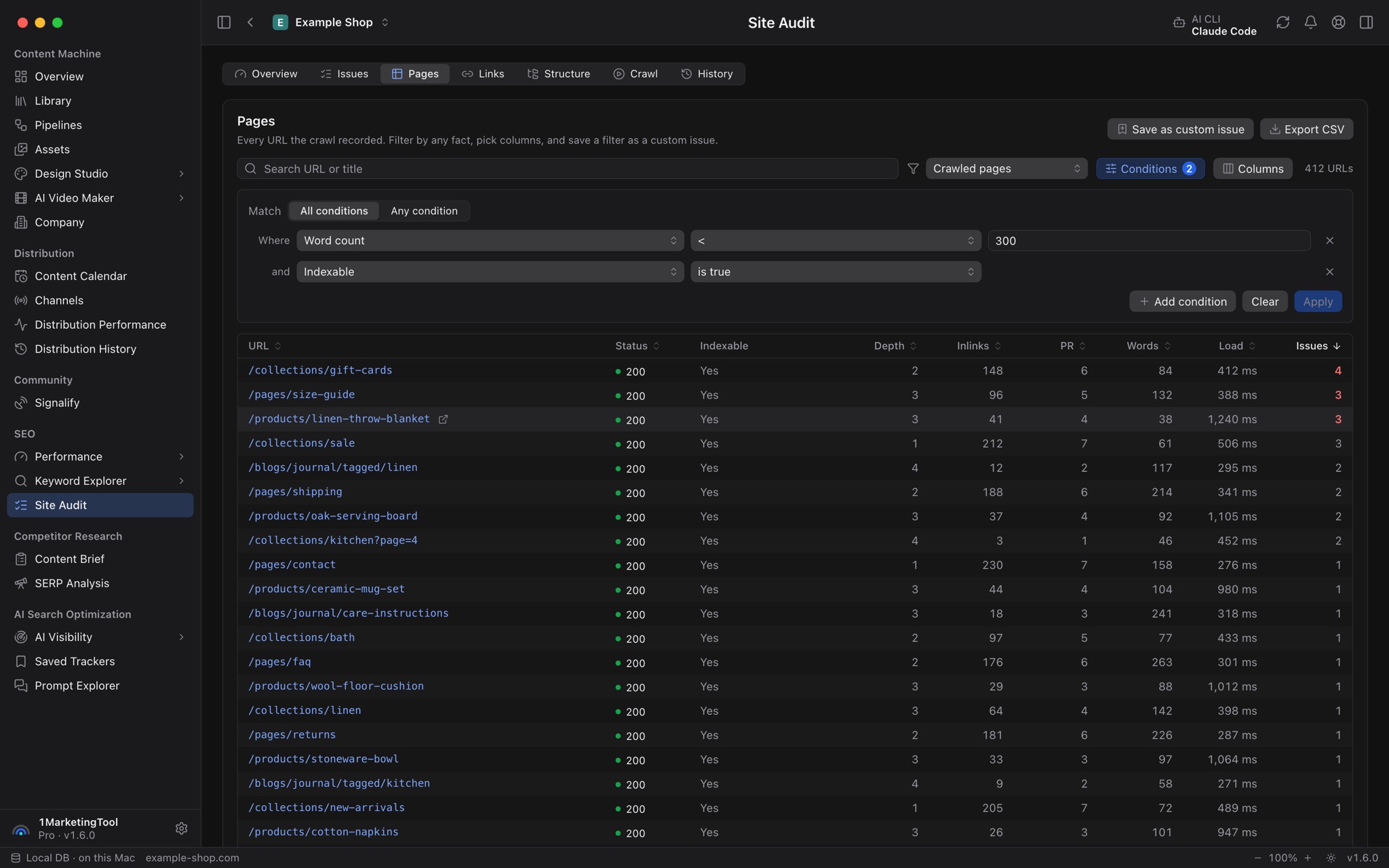
The Pages tab is every crawled URL in a table with a filter builder and a column picker. Links lists every link with its anchor texts. Structure rolls URLs up by folder with errors, depth and load time. With a Pro license, any view exports to CSV.
When a filter captures a house rule, such as "no product page slower than two seconds", click Save as custom issue. Every later crawl checks it like a built-in issue.
Add the checks a plain crawl can't do
Three optional checks run after the crawl, only when you turn them on:
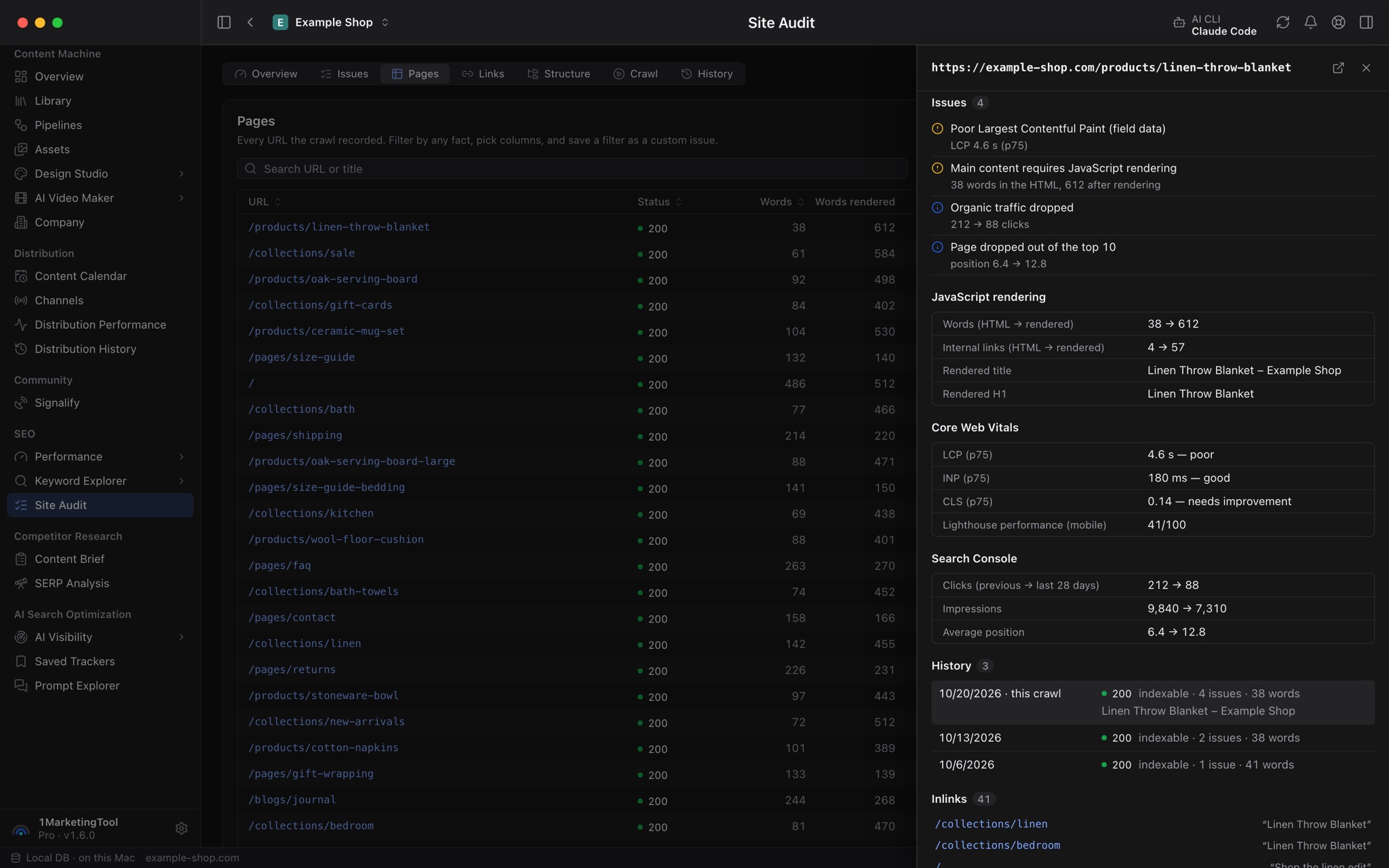
- Render JavaScript loads pages in a sandboxed browser and flags content and links that only appear after scripts run.
- Core Web Vitals pulls real-user LCP, INP and CLS from PageSpeed Insights for your most-linked pages.
- Search Console traffic joins 28 days of clicks, impressions and position, so broken, redirected or noindexed pages that still get clicks rise to the top, along with traffic drops and pages that fell out of the top 10.
Hand the fix to AI
From any issue you can Copy fix brief (a Markdown summary with the affected URLs), Ask AI CMO for a fix plan, or Copy agent prompt for a coding agent working in your site's repository. That prompt has the agent read the issue straight from 1MarketingTool through its MCP tools. A new Site audit tool group lets agents list audits, read issues and URLs, and start crawls on their own.
When the fix is live, Request indexing asks Google to crawl the affected indexable pages, up to 100 at a time, with your Search Console service account.
Before vs after
| Before | With Site Audit in 1.6.0 |
|---|---|
| Pay a cloud crawler per site, every month | Crawl up to 10,000 pages from your desktop |
| Export 400 broken-link rows to a spreadsheet | Read one issue that names the shared root cause |
| Diff this month's export against last month's by hand | Added, New, Removed and Missing per issue, plus a trend |
| Remember to re-crawl after every deploy | Scheduled crawls with health-drop alerts |
| Write up the fix for a developer | Copy a fix brief or an agent prompt that reads the issue over MCP |
| Submit fixed URLs one by one | Request indexing from the issue, or auto-submit to IndexNow |
Who benefits most
Indie founders running a marketing site and docs. A weekly scheduled crawl catches the broken link or the accidental noindex from last week's deploy before it shows up in traffic.
Developers who own the site's code. The agent prompt turns an issue into work a coding agent can pick up in the repository, with the affected URLs already attached.
Small agencies and consultants. Crawls stay on your machine, custom issues encode each client's rules, and with Pro every view exports to CSV for a report.
A safer app, too
1.6.0 also moves 1MarketingTool to Electron 44, a runtime that still gets security updates, and decodes Brotli-compressed pages with a memory-safe decoder, so a malicious site cannot reach a recently disclosed flaw in the runtime's own decoder. The app now refuses to start if its bundled code has been modified. 1MarketingTool now needs macOS 13 Ventura or later.
Try it
Update to 1.6.0, open SEO → Site Audit and run a crawl on your own site. Site Audit is part of the free plan; CSV and report exports need Pro. Fix the first root cause it names, run it again, and watch health move. You get an auditor that tells you what broke, what changed and how to fix it, with every result stored on your own machine.