Latest v1.4.0

1MarketingTool changelog.

New features, improvements, and fixes for the local-first marketing workspace.

23
Releases
108
New features
93
Improvements
54
Fixes
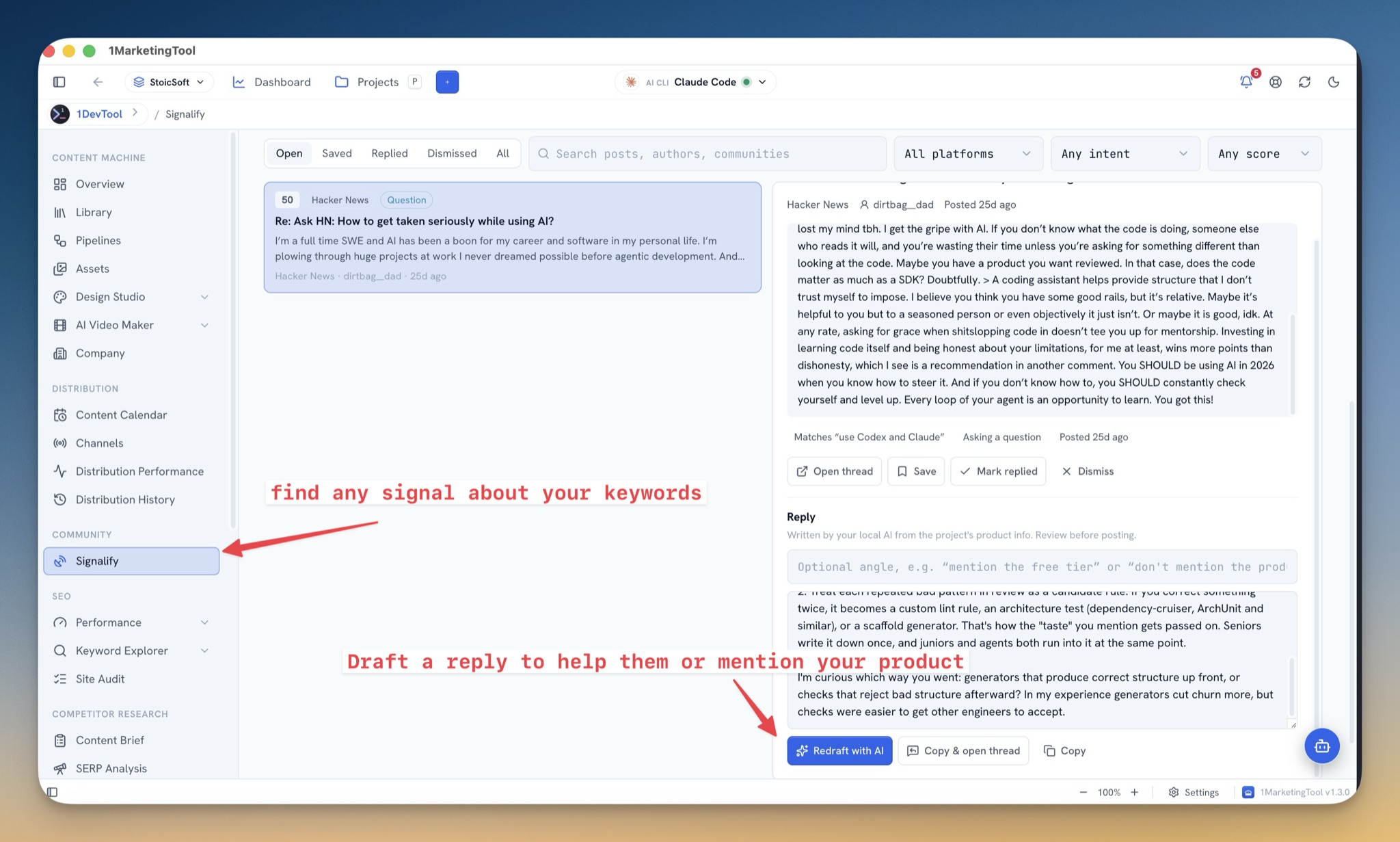
Signalify inbox showing a Hacker News question with a 50 intent score, the full post in the inspector, and an AI-drafted reply ready to copy
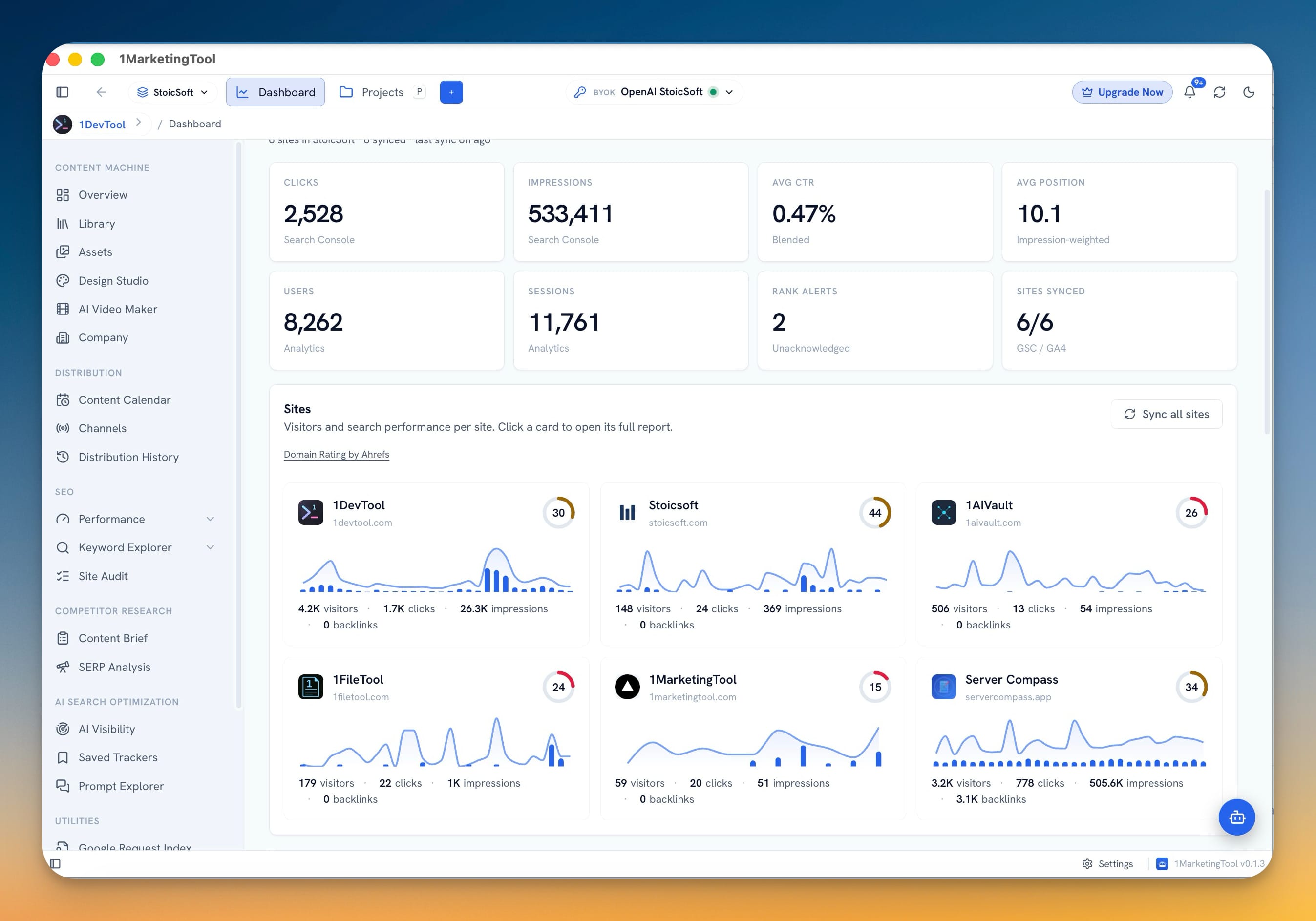
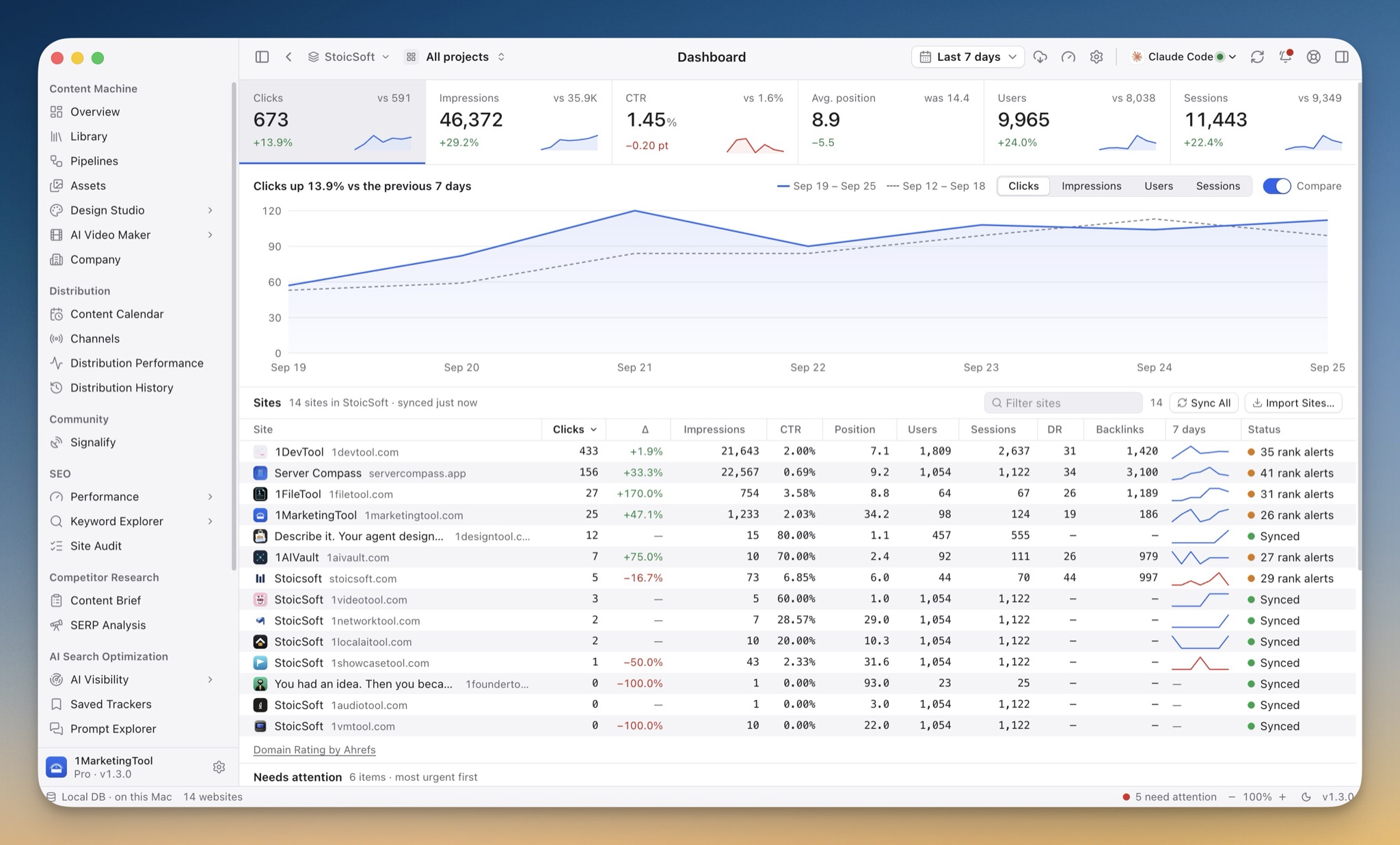
Redesigned Dashboard with a flat KPI strip of clicks, impressions, CTR, position, users and sessions, each with a sparkline and delta, above a sites table
v1.4.0LatestSeptember 28, 2026

Signalify and a Native Desktop Redesign

New features

  • Find people asking for what you sell — while they're still asking. A new Signalify page under Community listens for your project's keywords on Reddit, X, LinkedIn, Hacker News, Stack Overflow, Quora, forums, and any community domains you add.
  • The app now looks and feels like a native desktop tool. The whole interface was rebuilt on the platform's own design language instead of a web-dashboard look.
  • Sort, filter, and export the Content Library. The library gained a flat table view with sortable columns, status and channel filters, and a one-click CSV export of exactly what you see — UTF-8 safe for spreadsheet apps.
  • Meet the dedicated studios when you outgrow the built-in ones. A dismissible card in Design Studio and AI Video Maker introduces 1DesignTool and 1VideoTool — the StoicSoft apps that go deeper on design and video. A Pro license prefills the loyalty discount on the upgrade page.

Improvements

  • Performance pages read like instrument panels. Dashboard, Analytics, Insights, Links, and Index were rebuilt on flat KPI strips with inline sparklines and delta chips, replacing the old stacked cards.
  • Content Calendar is easier to scan. A mini month picker jumps to any date, and channel, status, and draft filters with per-channel counts narrow the grid to what you care about.
  • The comment queue got the same treatment. Comment panels and the detail view were rebuilt with the new layout and filters.
  • Distribution History and Settings were redesigned. History gains the native table-and-filter layout, and Settings sections now carry icons for quicker navigation.
  • The browser extension can live where you choose. Pick any folder for it — the app writes the files there, keeps them updated on every launch, and remembers the location in backups.
AI Access Setup tab with the 1MarketingTool MCP server running, connected-tools and 24-hour call counts, and Connect or Disconnect buttons for Claude Code, Codex CLI, Gemini CLI, OpenCode, Cursor and Windsurf
AI Access Tools & permissions tab with switches for the Rank & keywords, Content, Video, Website capture and Publishing tool groups and the Approved content only publishing guardrail
v1.3.0September 15, 2026

Connect Your AI Tools with AI Access

New features

  • Connect your AI tools to 1MarketingTool from one page. The `onemarketingtool` MCP server moved out of a Settings sub-tab into its own **AI Access** page under System.
  • Let agents publish — after a human approves. AI agents can now list your channels, publish library pieces, schedule them for later, list scheduled posts, and cancel them, through a new publishing tool group.
  • Post to X as a different account than the app owner. The X channel gained a **Connect** button: approve the app in a browser signed in to the account you want to post as — a brand handle instead of the developer account that owns the keys — and the tokens are stored on this device. Pasting an owner access token still works when you only post as the app owner.

Improvements

  • X channel setup matches the current X console. Fields are renamed to Consumer Key / Consumer Key Secret with one-line hints telling them apart from the OAuth 2.0 Client ID the console also shows, the access-token pair is optional when you use Connect, and the setup guide walks through console.x.com — including where pay-per-use credits actually live.
  • Every agent call is logged by name. MCP calls land in Logs → AI and the AI Access activity feed under the tool that ran, and calls refused by your permission switches show as blocked rather than failed.
  • The local bridge agents talk to is locked to your tools. It now requires a per-launch token and refuses requests that arrive from a web page, so the publishing tools can't be driven by anything except the clients you connected.
  • AI setup links go to the right place. Onboarding, capability setup, and Settings all route to the AI Access page instead of the retired MCP tab.

Fixes

  • Clients pointing at an old install reconnect themselves. On launch, saved MCP entries that reference a server script which no longer exists are repointed to the current one — updating the app no longer leaves connected tools silently dead.
  • X billing errors name the real problem. An out-of-credits response now identifies the developer account X billed and sends you to console.x.com → Billing → Credits instead of the Event subscriptions page — and tells you to check the Development-to-Production app switch when the balance already looks fine.
AI Visibility Tracker setup with the Tracks AI answers across strip listing AI Overview, AI Mode, ChatGPT, Perplexity, Gemini, Claude and Grok above the keywords and domain fields
Edit AI Visibility Tracker showing the AI Engines grid with three of seven engines enabled and a route badge under each one reading Browser scrape free, DataForSEO, or Auto DataForSEO
v1.2.0September 4, 2026

Multi-Engine Visibility & Image Generation

New features

  • Track your brand across seven AI answer engines. AI Visibility now covers ChatGPT, Perplexity, Gemini, Claude and Grok alongside Google AI Overview and AI Mode, all asked the same terms in the same run.
  • Find the questions where AI already cites you — no term list required. AI Visibility gained a **Mentions** tab that searches DataForSEO's archive of Google AI Overview and ChatGPT answers for your domain. The questions come back as the result, so you do not have to guess the prompts first.
  • See whether a visibility move is real or just sampling noise. A tracker can ask each term up to five times per run, and the new **Engines** tab reports each engine's visibility with a 95% range beside it. A change smaller than that range is noise, not a trend.
  • Image Generation is live. Design Studio → Image Generation replaced its coming-soon placeholder: write a prompt, pick a size, and the result lands in your asset library.
  • A guided tour of how the app actually works. A new button in the top bar — and a card in onboarding — opens a six-chapter walkthrough: where your data lives, projects, making content, shipping it, learning from it, and how the AI runs. Each chapter is animated, jumps straight to the screen it describes, and the tour remembers where you stopped.

Improvements

  • Hashnode publishing works again, and setup got shorter. Hashnode moved its API endpoint, which had left the channel failing for everyone; it now points at the live one.
  • Antigravity joins the local CLI roster. The `agy` CLI is detected alongside Claude Code, Codex, Gemini, OpenCode, Amp, Qwen, Hermes, Aider and Grok — select it in the AI CLI picker, choose its model, and install the SEO agent skills into it.
  • Your own model key is now its own setup step. Onboarding and the capability cards list an AI provider key separately from local CLIs, with what it unlocks: tracking ChatGPT, Claude, Gemini and Perplexity answers on your key instead of paid DataForSEO requests.

Fixes

  • Image and video generation no longer fails on Gemini CLI with a "trusted directory" error. The app now marks the scratch folder it created and filled itself as trusted, which was the gate that stopped both the one-shot and session runs.
  • Launching the app while it is already running brings your window back. Opening it a second time — from the dock, the taskbar, or a shortcut — now restores and focuses the window you already have instead of doing nothing.
  • Reopening a closed window no longer lands on a shut-down database. Parts of the app kept talking to the connection that was closed on the way out; they now pick the live one back up.
Workspace Dashboard with the Compare to previous 7 days toggle on, showing change chips on the Clicks, Impressions, Avg CTR, Avg Position, Users and Sessions cards and dashed prior-period lines on the per-site sparklines
Settings then API DataForSEO panel listing a saved key with an Active badge and Add key, Check active key, edit and delete controls, above the credit balance and daily spend quota
v1.1.0August 23, 2026

Period Trends & Multi-Key SEO

New features

  • See how every number moved with Compare to previous period — the dashboard measures your selected range against the equal-length window right before it, on by default. Clicks, impressions, average CTR, average position, users, and sessions each show a change chip, and the trend chart and per-site sparklines add a dashed line for the prior period. Colors read by outcome, not direction, so a falling average position shows as an improvement, and the comparison appears once a site has been synced for the active range.
  • Keep more than one DataForSEO key and let the app rotate them — Settings → API now holds multiple named DataForSEO keys you can add, rename, edit, delete, and balance-check on their own. Choose Use one key to pick the active key, or Rotate to spread lookups across all of them and automatically skip any key that is out of credit, rate-limited, or failing authentication, so one exhausted key no longer stalls your SEO research. Status badges show which keys are healthy, and the pre-lookup confirmation shows your live account balance, warns when it can't cover the estimated cost, and links straight to Add credit.
  • Build a campaign brief straight from a web page — New Campaign has a From URL button that pulls the readable text and images of one or more pages into your brief. Paste several URLs at once and each fetches with its own progress and result.

Improvements

  • Target AI visibility trackers to any market — the tracker location field is now a searchable picker that accepts custom countries and cities instead of only the seven presets, so results reflect the market you actually care about, for example Vietnam or Hanoi,Vietnam. Locations you add are remembered for next time and shown with a country flag.
  • Repurposing a page now brings its real photos — importing or repurposing an article pulls the images from inside the post, including lazy-loaded and high-resolution versions, instead of only the social-share preview, while skipping logos, icons, avatars, and tracking pixels.

Fixes

  • A stopped sync stays stopped — bringing the window back into focus no longer restarts background sync after you have turned it off.
Settings → Sync Overview tab with a connected Nearby transport, 4 trusted devices, and the What syncs grid showing Workspaces & products, Content library, Assets & designs, Video storyboards, Scheduling and Automations enabled with their synced record counts
Nearby Sync setup panel with the Enter Code tab active and a STOIC- pairing code pasted into the Pairing code field, above Check code and Back buttons
v1.0.0August 14, 2026

Encrypted Cross-Device Sync

New features

  • Sync your marketing workspace across the machines you already use — Settings → Sync creates an encrypted space that carries workspaces, projects, the content library, assets and designs, video storyboards, the schedule, pipelines, and portable preferences to every participating device. API keys, OAuth tokens, license keys, and other credentials stay in each machine's keychain and never enter the space.
  • Re-Generate an entire campaign in one pass — Campaign Results now has Re-Generate all. It opens the same channel settings you use when adding channels, pre-filled from the current pieces — language, output format, account, media — so you can run the set again.

Improvements

  • Adding channels now takes every image and video already on the campaign — New pieces get the full set instead of only the first piece's attachments.
  • Over-long X posts are fitted to the character limit — Generation shortens a post that ran long and notes the new length in the generation log, instead of leaving a draft that X will reject.
  • Character limits stay out of the post — Threads, Bluesky, and Mastodon pieces no longer mention the count they were asked to honor.

Fixes

  • Generated posts no longer open with the agent's working notes — CLI agents — Grok especially — that prefaced copy with "I'll inspect the brief…" or appended "want me to revise?" now have that operator chatter stripped, so the piece starts with the publishable first line.
  • Pause on a social pipeline actually stops the next run — Pause now clears the scheduled next-run time instead of only flipping the status, so a paused pipeline stays quiet until you start it again.
Pipelines view with an active Social from khoa.lowkey pipeline expanded, showing its Trigger, Transform, Publish to and Output nodes on the pipeline graph
Social repurpose Source tab with Facebook selected and a public profile URL pasted into Watch URL, every channel card marked URL watch
v0.15.0August 11, 2026

Automated Pipelines and Web Search

New features

  • A Social repurpose pipeline that runs without opening New Campaign every time — Pipelines is a dedicated view for watching a source channel, adapting each new post for the destinations you choose, and either saving drafts or scheduling them to publish.
  • Watch a public URL when the channel API can't list posts — Pipelines can poll a public profile or post URL instead of a connected account — useful for personal Facebook profiles, LinkedIn without read approval, and any channel where a public page is the only source you have.
  • Watch local folders and turn every new file into content — The Directories tab is now a folder pipeline: point it at folders on your machine, and each new file that lands there becomes a campaign on the next check — no paste, no upload step.
  • Per-channel overrides inside a folder pipeline — A selected destination shows a summary strip — `EN · Plain text · Balanced` — that opens the same inline settings panel used in New Campaign, so one channel can run in two languages, Markdown, and a more detailed voice while the rest keep the pipeline defaults.
  • Optional web search while campaign content is generated — A Web switch in the campaign composer lets the content AI look up live sources when writing, instead of only the brief and model knowledge.
  • Generation logs that show the search and the sites — When web search runs, Generation Logs open and list each query, then the results as concrete sites — hostname, title when available, and an open link — so you can see what the AI actually looked at.
  • Grok as a local CLI agent — Grok Build is detected alongside Claude, Codex, Gemini, and the other local agents, selectable for campaign generation, redesign, and the rest of the local AI routes.

Improvements

  • Jump from a pipeline run to what it produced — A run row in the shared Logs tab now carries Campaign and Distribution actions — the first opens the campaign results for that run's output, the second opens Distribution History already filtered to that pipeline. Runs that produced nothing show no actions.
  • Distribution History tells automated pieces apart from hand-run ones — Pieces written by a pipeline carry a Pipeline badge naming the pipeline and the source it came from, and a new Pipeline filter narrows the whole table — counts included — to a single pipeline's output.
  • One Logs tab for both pipeline kinds — Social and folder runs share the same history, with wording that matches what actually ran ("Scanning the watched folders…" versus "Checking the source channel…").
  • More source channels for pipeline watching — Connected-account sources cover Facebook Pages, X, Instagram, Threads, YouTube, TikTok, Bluesky, and Mastodon where the channel is set up; LinkedIn can still use URL watch when Graph read access isn't available.
  • Pipeline config that matches how campaigns already work — Destination channels, language, content detail, and output format reuse the same options you already set in New Campaign, so a pipeline and a one-off campaign stay consistent.
  • Campaign drafts and presets remember the Web switch — Turning web search on for a draft survives reloads, and Save preset can store it as the default for new campaigns.
  • Open a watched folder from the app — The path under each folder in the pipeline config is a button that reveals it in Finder or Explorer.

Fixes

  • The installed app now uses the right typefaces — Fonts ship with the app instead of being fetched on launch, so the packaged build no longer silently falls back to a system font — and a local-first app makes one less network call at startup.
  • AI CLIs on Windows that were detected but refused to run — Agents installed as a command shim that forwards to a bundled executable — Claude Code among them — reported "Cannot run Windows command shim safely" instead of launching. They now start correctly.
  • Windows agents no longer fail right after a reboot — A cold start could push several CLIs past the version-check timeout at once, showing installed, working agents as errors until you pressed Rescan. Windows now gets a longer window.
New campaign composer with the Repurpose switch on, Repurposing from LinkedIn selected, and a pasted post URL being fetched with its two images imported as campaign media
Repurpose source modal titled Recent Facebook posts, listing recent Page posts with thumbnails, Page names, dates and image counts, ready to pick one as the campaign source
v0.14.0August 7, 2026

Repurpose straight from the Content Library

New features

  • Turn one post you already wrote into every other channel — a Repurpose switch in the campaign composer changes what the source means: instead of a loose brief it is a finished post, and every channel you select gets a native adaptation of that exact message, keeping your story, tone, numbers, names and links and rebuilding only the hook, length and structure.
  • Load one of your recent posts instead of pasting it — with Facebook chosen as the source, Load posts lists your recent Page posts through the same Page mapping publishing uses, and picking one fills the source text and pulls its images in as campaign media.
  • Pull a post in from its URL — From URL fetches a public post or article, extracts the readable text and downloads its lead and in-content images into the campaign's media, reading Facebook post URLs as the post itself rather than the page furniture and comment thread around it.
  • Repurpose straight from the Content Library — every piece row has a Repurpose action that opens New Campaign with that piece as the source, switches to its project, and drops its own channel from the targets so you never regenerate the post you started from.

Improvements

  • Repurpose survives the rest of the campaign flow — regenerating a piece and adding more channels to a finished campaign both keep the source post and its channel, so later pieces read like the first ones rather than drifting back into generic copy.
  • Campaign drafts remember the repurpose source — the switch, the source channel and the imported media are saved with the draft, and older drafts open unchanged.
  • Local AI agents can repurpose too — the campaign tool exposed to your CLI agents accepts a repurpose source mode and the originating channel, so an agent can hand over a finished post and get the other channels back.
Facebook channel settings in New Campaign showing an Accounts section with two Pages, one switched off and reading "Skipped for this campaign" while the other stays on and inherits the channel defaults
v0.13.0August 1, 2026

Account Control and ZIP Downloads

New features

  • Skip individual accounts without dropping the channel — each connected account in New Campaign has its own Generate switch, so a channel with three accounts can write for two of them and leave the third alone. The channel row counts what will actually run ("2/3 accounts") and a skipped account reads "Skipped for this campaign" instead of showing settings that won't be used. The piece count and the cost estimate follow the switches, turning every account on a channel off skips that channel entirely, and the choice is saved with the campaign draft.

Improvements

  • Download all the media on a piece in one go — a campaign piece with several images or videos attached now saves them as a single ZIP archive from one save dialog, rather than asking where to put each file in turn. Files that share a name are numbered inside the archive so nothing is silently overwritten, the archive is named after the campaign, the button reports progress while the archive is built, and a piece with one attachment still downloads as a plain file.
Preview before posting modal with a Follow-up comments section applied to three selected pieces, one comment set to post 90 seconds after the post
Saved comments modal editing a reusable Download link block with auto-attach enabled for Mastodon, Bluesky, X, and LinkedIn
v0.12.0July 27, 2026

Follow-up comments on the posts you publish

New features

  • Follow-up comments on the posts you publish — write the comments that land under a post (contact details, a link, the rest of a thread) while you compose it, in the post composer and in the campaign Post Now preview; each comment posts With the post or After a delay from seconds to days, a saved-comment library holds reusable blocks with per-channel auto-attach, and it works on X, Bluesky, Mastodon, Threads, LinkedIn, Facebook Pages, Telegram, WordPress, and YouTube
  • A comment queue you can watch and intervene in — new Comments tabs on the Schedule calendar and in Distribution History list every follow-up filtered by Waiting, Posted, and Needs attention, with Post now to skip the trigger, Cancel so it never goes out, and a per-attempt log and public link
  • An alert inbox in the Activity Center bell — AI-visibility drops and gains, a competitor moving ahead, a failed tracker run, and any background task that dies off-screen now report themselves, with unread counts, click-through to the tracker, desktop banners behind a severity floor, and one alert per repeating failure rather than one per sweep
  • Shareable HTML reports — AI-visibility trackers and site audits export a single self-contained HTML file with metrics, trend chart, tracked terms, competitors, and issues by severity that opens in any browser and needs no network access
  • Design post images from a reference you like — point the campaign image panel at an asset-library image, add a direction in your own words, and get alternatives that rebuild that design language with your content; the direction can also set the size
  • Choose the output format for generated content — every channel in a campaign can generate Markdown, plain text, or HTML, each starting from a suggested default (HTML for WordPress and Ghost, Markdown for Discord and Reddit, plain text for social)
  • Generate more channels with the full campaign controls — adding channels to an existing campaign now offers post type, per-channel and per-account language, output format, image handling, a Studio design, and Facebook Page targeting
  • Zoom the whole app — a zoom control in the status bar with the current percentage, matching View menu items and shortcuts, remembered between launches

Improvements

  • One local AI server instead of four — the rank, content, video, and browser tools now live behind a single onemarketingtool server, so a CLI agent needs one config entry rather than four
  • See which account each channel posts as — a Show accounts toggle in New Campaign reveals the account, Page, site, or board behind each channel before you generate
  • URL imports name what they skipped — file, sitemap, and paste imports list the URLs they couldn't use with a short reason each and a copy button, instead of a bare count
  • Sitemap loading is more patient and more honest — at most three sitemaps fetched at a time with one retry on a stall, live progress, a retry button for just the failures, and an empty-but-answering sitemap called out rather than counted as empty
  • Popovers stay on screen — the import help panel and sitemap paste box are no longer clipped by their parent panel, and a tall one scrolls inside itself
  • Setup guides cover the comment permissions — the Facebook, Threads, and YouTube guides now name the extra permission follow-up comments need and where to add it

Fixes

  • YouTube uploads are tracked after publishing — an upload now records the published video, so it appears in distribution performance and can carry follow-up comments
  • A regenerated piece survives closing the dialog — Re-Generate results are kept after the task finishes, so reopening the campaign or a second window shows the outcome
  • Discord posts keep their formatting — generated Discord announcements can use Markdown again rather than being forced to flat text
Google Request Index history with an Index Status column showing each submitted URL as Indexed or Discovered - currently not indexed
IndexNow Submit tab with an Import from file button and a batch of URLs loaded from a CSV, ready to submit
v0.11.0July 24, 2026

Live Google index status in history & Cross-post a piece to another channel

New features

  • Live Google index status in history — the Google Request Index history now shows each submitted URL's real Google verdict (confirmed indexed, not indexed, or unknown) read from URL Inspection; it reads a local cache first to save inspection quota, checks never-seen URLs once, gives every row a manual re-check, and reports a running count of how many are confirmed indexed
  • Import URLs from files and sitemaps — Google Request Index and IndexNow can load a whole batch at once: import from a file (one URL per line or CSV/TSV cells, tolerating quotes, headers, blank lines, and comments) or paste sitemap URLs to pull every same-host page (following one level of sitemap index); results are merged, deduplicated, and queued for review before submit
  • One-click YouTube connection — YouTube connects through 1MarketingTool's verified Google app, so uploading videos no longer requires registering your own OAuth credentials; power users can still paste their own Client ID and Secret behind an Advanced option
  • Cross-post a piece to another channel — a new Post to other channel action opens Post Now with nothing preselected, so a piece written for one channel (say Discord) can be sent to a different connected channel such as X, reusing its text and attached media as-is
  • Download generated media and library assets — campaign pieces with an attached image or video get a Download button in the detail preview, and the asset library adds Download to any locally stored file, each saving through a standard Save dialog

Improvements

  • Regenerate the correct post type — Re-Generate now respects whether a piece should produce an image or a finished video, older YouTube pieces saved as scripts upgrade to the local MP4 render pipeline, and the dialog keeps the existing version while letting you choose the new post type and image mode
  • Cleaner one-click channel setup — hosted-app connectors keep a single Connect button while optional bring-your-own credentials move into an Advanced accordion

Fixes

  • Local AI marketing tools now load reliably — the MCP servers used by local CLI agents were renamed from numeric names like '1marketingtool-browser' to letter-prefixed 'onemarketingtool-browser' because some AI clients silently exposed no tools when a server name began with a number; legacy entries are removed on setup and '1mkt', '1marketingtool', and 'onemarketingtool' still work as spoken aliases
  • Long Threads posts no longer fail — a post over Threads' 500-character limit is trimmed to fit and published (with a note) instead of returning a server error
  • Generated images and videos now show on the campaign detail page instead of a brand-name placeholder
Content library list showing a saved campaign carrying a Draft status badge alongside published and mixed-status campaigns.
Content Calendar Drafts rail listing three auto-saved post drafts with a prompt to open any draft and continue where you left off.
v0.10.0July 21, 2026

Drafts and Campaign Delivery

New features

  • Multiple recoverable drafts per project
  • Finished short videos from campaigns
  • Selective campaign delivery

Improvements

  • Tracked campaign publishing
  • Faster channel setup
  • Clearer Facebook Page routing
  • Fewer macOS keychain approvals

Fixes

  • Accidental composer dismissal no longer loses a post
  • Meta connections keep the correct lifetime
  • Failed video renders are not presented as publishable media
New campaign composer assigning per-channel languages, with Facebook set to both English and Tiếng Việt and per-account language overrides.
Threads channel settings granting the analytics read scopes threads_manage_insights and threads_read_replies before pulling performance metrics.
v0.9.0July 19, 2026

Distribution Performance dashboard

New features

  • Distribution Performance dashboard. A new Distribution view, placed after Channels and before Distribution History, reports how your published posts actually performed using each platform's official analytics rather than estimates.
  • See total posts, exposure, reach, and engagement for any period, plus a trend chart, a best-time-to-post heatmap, your top posts, a per-channel comparison, and how many audience conversations earned a reply.
  • Covers X/Twitter, Facebook Pages, Instagram, Threads, YouTube, TikTok, Pinterest, Bluesky, and Mastodon, refreshing when you open the app and periodically after that, with historical posts backfilled where their identity is unambiguous.
  • Every number shows its source, freshness, and coverage; metrics a platform doesn't expose are labeled as unavailable instead of shown as zero.
  • Capture a website's visual style. Point Design Studio at a website — usually your own product site — and it reads the page's real colors, fonts, and shapes into a reusable design system. A new Website style toggle then applies that captured look to generated marketing images, so campaign visuals match your brand automatically. Pages are read only inside a sandboxed, isolated window.
  • Per-channel campaign languages. Choose one or more languages for a campaign and, when you want, assign different languages to different channels — for example English on LinkedIn and Vietnamese on Facebook. You can type a custom language that isn't in the list, and both the written copy and the generated design images follow the language you pick.
  • Pre-publish media checks. Before a post goes out, attached images and videos are checked against each destination's real limits — file size, count, dimensions, duration, and format — so oversized or unsupported media is caught in the composer instead of failing at publish time.

Improvements

  • Custom values in selection fields. Dropdowns across the app can now accept a typed value that isn't in the list, making it easy to add a custom language or other free-form option.
  • Request analytics permissions while connecting a channel. Connecting or reconnecting a channel can now request the extra read permissions its analytics API needs, so Distribution Performance can pull metrics for that account.
  • Fuller distribution history. The distribution history detail view now shows richer, step-by-step logs for each publish attempt.
  • Consistent media in campaign previews and Post Now. Attached images and videos are validated and previewed consistently across the campaign composer and the Post Now flow before delivery.

Fixes

  • Non-Latin languages stay intact in generated content. A writing-style skill can no longer force generated copy or design images into ASCII or transliterate the target language, so languages such as Vietnamese render correctly.
v0.8.0July 17, 2026

Native Hermes Agent support

New features

  • Native Hermes Agent support. Detect Hermes on macOS, Windows, and Linux and run it through its native one-shot mode for content generation, Prompt Explorer comparisons, and other local AI workflows. Hermes also supports per-run model selection and installation of 1MarketingTool agent skills.
  • Controllable background updates. A new Updates settings page lets users choose a passive toolbar pill, the full update dialog, or silent notifications; control automatic downloads and install-on-quit behavior; set the background check interval; and check manually at any time.
  • Live update status. The toolbar now moves from available to download progress to relaunch-ready without interrupting work. The update dialog can start a background download, close safely, and reconnect to the same progress when reopened.
  • Redesigned license experience. Settings now presents the actual Free and Pro limits, current device and update eligibility, license activation and validation, perpetual-use guidance, renewal pricing, and StoicSoft bundle or loyalty options in one focused view. Free users also get a consistent Upgrade to Pro entry in the header with a compact plan comparison.
  • License-aware update offers. Feature releases now respect each Pro license's included update window. A later release routes the user to renewal instead of downloading automatically, while the installed Pro version and its unlocked features remain usable without a subscription.

Improvements

  • Clearer pricing and renewal choices. License tiers show their real prices, device counts, savings, and one-time purchase terms. Expired update eligibility is framed as an optional renewal for another year of releases, not the loss of an existing perpetual license.
  • Persistent update progress. Update state is retained in the main process, so a newly opened dialog or a recreated macOS window immediately shows the current version, progress, retry, or ready-to-install state.
  • Complete differential-update artifacts. Release builds now keep blockmap metadata paired with renamed Windows installers and Linux AppImages and publish the required blockmaps for every desktop platform.

Fixes

  • Interrupted downloads recover automatically. A network or VPN change during a background download now triggers bounded retries instead of silently abandoning the update.
  • Downloaded updates are staged only once. Repeated checks no longer re-download or re-stage the same completed update, preventing macOS installer races that could relaunch the old version or report too many install attempts.
  • Restart and install is dependable. Repeated clicks are handled as a single install request, preparation cannot hold the installer indefinitely, and packaged macOS builds have an exit fallback so the replacement can finish.
  • Update dialogs preserve active work. Opening the dialog during an existing download no longer starts a competing update check, and closing it no longer hides background progress or scheduled retries.
v0.7.0July 17, 2026

Native Hermes Agent support

New features

  • Native Hermes Agent support. Detect Hermes on macOS, Windows, and Linux and run it through its native one-shot mode for content generation, Prompt Explorer comparisons, and other local AI workflows. Hermes also supports per-run model selection and installation of 1MarketingTool agent skills.
  • Controllable background updates. A new Updates settings page lets users choose a passive toolbar pill, the full update dialog, or silent notifications; control automatic downloads and install-on-quit behavior; set the background check interval; and check manually at any time.
  • Live update status. The toolbar now moves from available to download progress to relaunch-ready without interrupting work. The update dialog can start a background download, close safely, and reconnect to the same progress when reopened.
  • Redesigned license experience. Settings now presents the actual Free and Pro limits, current device and update eligibility, license activation and validation, perpetual-use guidance, renewal pricing, and StoicSoft bundle or loyalty options in one focused view. Free users also get a consistent Upgrade to Pro entry in the header with a compact plan comparison.
  • License-aware update offers. Feature releases now respect each Pro license's included update window. A later release routes the user to renewal instead of downloading automatically, while the installed Pro version and its unlocked features remain usable without a subscription.

Improvements

  • Clearer pricing and renewal choices. License tiers show their real prices, device counts, savings, and one-time purchase terms. Expired update eligibility is framed as an optional renewal for another year of releases, not the loss of an existing perpetual license.
  • Persistent update progress. Update state is retained in the main process, so a newly opened dialog or a recreated macOS window immediately shows the current version, progress, retry, or ready-to-install state.
  • Complete differential-update artifacts. Release builds now keep blockmap metadata paired with renamed Windows installers and Linux AppImages and publish the required blockmaps for every desktop platform.

Fixes

  • Interrupted downloads recover automatically. A network or VPN change during a background download now triggers bounded retries instead of silently abandoning the update.
  • Downloaded updates are staged only once. Repeated checks no longer re-download or re-stage the same completed update, preventing macOS installer races that could relaunch the old version or report too many install attempts.
  • Restart and install is dependable. Repeated clicks are handled as a single install request, preparation cannot hold the installer indefinitely, and packaged macOS builds have an exit fallback so the replacement can finish.
  • Update dialogs preserve active work. Opening the dialog during an existing download no longer starts a competing update check, and closing it no longer hides background progress or scheduled retries.
Generate another X piece modal with Adjust with prompt selected, Claude Code chosen as the CLI AI for this rewrite, and generation progress running.
Campaign results showing an X piece switched to version v3 in the version dropdown, with its attached media rendered in the post preview.
v0.6.0July 15, 2026

Campaign Versions and Delivery

New features

  • Versioned AI rewrites — Re-generate a campaign piece as a fresh variation or guide the rewrite with a specific adjustment prompt. Every rewrite is saved beside the original, and a version dropdown switches between the latest result, earlier versions, and the original content without losing work.
  • Per-rewrite AI control — Choose Auto or any detected local CLI agent for an individual rewrite without changing the global AI route. The regeneration panel shows ongoing progress, timestamped logs, a live draft, and the finished result.
  • Flexible cross-posting — Post a single content version to any connected publishing channel assigned to the project, such as reusing X content and media on Bluesky or LinkedIn. Text and attachments are carried to each selected destination as-is.
  • Campaign delivery status — Campaign Results now shows the latest publishing, success, partial, skipped, or failed state for each selected version, including the channel message, timestamp, public post link when available, and access to full distribution history.

Improvements

  • Media-complete previews — Attached images and videos now appear with the selected content version across X, LinkedIn and Facebook, Reddit, blog, general social, document, YouTube, TikTok, and Instagram previews.
  • Clearer Post Now results — Publishing outcomes appear progressively for each destination, channel-level totals distinguish partial delivery from complete success, and failed results stay open for review or retry.
  • Safer Bluesky and Mastodon delivery — Posts over the platform limit are shortened at a word-safe, emoji-safe boundary instead of failing, and the result explains when the published text was shortened.
  • More scannable dashboard metrics — Dashboard cards now pair each metric with a clear icon and show Search Console or GA4 source marks where relevant.
  • Better Google connection guidance — Google settings compare account sign-in with service accounts, explain which path supports indexing, and offer the service-account route when sign-in is cancelled or blocked by a Workspace policy.

Fixes

  • Prompt regeneration finishes correctly — Prompt-guided rewrites no longer remain in an endless loading state after content is saved. Completed runs show the generated result, while failed runs stop promptly and retain the error in the progress log.
  • Failed delivery details keep their layout — Long channel errors no longer stretch Campaign Results cards or push the version dropdown out of view, so users can still switch versions and open the full failure detail.
v0.5.0July 14, 2026

Video and Media Studio

New features

  • Governed multi-scene video production — AI Video Maker turns a brief, campaign, website, or GitHub release into a Launch, Feature, Changelog, or Teaser storyboard, and can pause for approval of the script, scene plan, rendered clips, and final MP4.
  • Editable storyboard timeline — add, remove, reorder, and trim scenes; choose cut, fade, or slide transitions; edit scene copy and burned-in captions; and undo or redo saved storyboard revisions.
  • Direct image and video generation — new Image Generation and Video Generation pages create model-native media from a prompt, reference image, or start frame, with durable job history, cancellation, and manual retries.
  • Campaign-to-creative handoff — select an existing campaign as the source for Creative Builder or Storyboard Builder, carrying its brief, generated pieces, target channels, and linked images into the new visual or video direction.
  • Video MCP control — a fourth bundled MCP server lets compatible local ACP agents read and write revisioned storyboards, manage scenes, captions, and transitions, and compose only after the required human approval.
  • Additive campaign variants — generate another image post or video/short for a channel without replacing the existing piece, reusing campaign images or a branded square graphic.

Improvements

  • Safer media-provider setup — configure OpenAI or OpenAI-compatible media profiles separately from text models, test each connection, choose image and video defaults, and keep credentials in the local OS keychain.
  • Clearer Google account management — sign-in, service accounts, and project mapping are separated, with rename, test, default, refresh, and remove actions and a safe fallback account.
  • Visible Writing Style Mimic progress — voice analysis now shows each URL and file as it is read, the amount of source material prepared, the selected local AI, and a live progress meter.
  • Easier AI route recognition — local CLI agents and BYOK providers use recognizable identities across the top-bar selector, onboarding, settings, Prompt Explorer, MCP setup, and logs.

Fixes

  • Campaign output stays publishable — generated pieces no longer include trailing AI analysis, input-conflict notes, caveats, or offers to revise.
  • Google authentication errors explain the cause — OAuth refresh and service-account failures surface provider details instead of a generic HTTP 400.
  • Software update notes retain useful formatting — update dialogs display sanitized headings, lists, links, code, tables, and release images.
  • Instagram and Threads keep local media in release builds — packaged releases now include the upload authorization needed to relay local-file attachments.
“Teach the AI your voice” modal with fields for a style name, blog URLs to scan, pasted writing samples, and attached Markdown files.
“Review your new style skill” screen showing the distilled style guide with Voice and Tone rules before saving.
v0.4.0July 14, 2026

Custom Voice and Reach

New features

  • Writing Style Mimic — distill a reusable writing style from URLs, pasted text, or files, locally
  • Campaign channel expansion — generate more channels from an existing campaign
  • Automatic Instagram artwork — reuse media or generate a branded 1080×1080 image per caption
  • DataForSEO keyword clustering — AI semantic grouping or DataForSEO ideas by seed and intent
  • Project information re-fetch — re-scan a URL and fill only blank product fields

Improvements

  • Referring-domain authority comparison (Ahrefs DR beside DataForSEO Domain Rank)
  • Safer local credentials with OS-backed encryption and verified sign-in redirects
  • More deliberate channel authorization (browser choice, reopen/copy link, account profile)
  • Faster campaign and creative workflows (non-blocking draft saves, streamed previews)
  • Current channel compatibility (Instagram Professional login, Threads BYOK, Medium removed)

Fixes

  • Generated campaign pieces stay drafts until you post or schedule them
  • OAuth retries recover without a restart (no callback-port error)
  • Windows uses the 1MarketingTool identity for notifications and shortcuts
Preview before posting modal showing campaign pieces for LinkedIn, X, Discord, Bluesky, and Mastodon with ready, skipped, and posted status counts.
1MarketingTool campaign workspace showing multi-site analytics cards, content scheduling, SEO tools, and active AI CLI integration.
v0.3.0July 7, 2026

Campaign Delivery

New features

  • Project-aware channels. Channels now separate "This project" from "All channels", show which projects each connector can publish from, and include a matrix for channel coverage across projects.
  • Channel-specific campaigns. New Campaign can generate one ready-to-publish piece for each selected destination, including LinkedIn profiles/pages, Facebook, X, Threads, Bluesky, Mastodon, Pinterest, Telegram, Slack, Discord, blog channels, and video channels.
  • Campaign delivery controls. Campaign results now include Post now and Schedule all flows that show which pieces can publish, which channels are missing, and which pieces are already published.
  • Performance country maps. Search Console and GA4 country rows can be explored on bundled offline 2D maps and 3D globes, with metric switching for clicks, impressions, CTR, position, users, sessions, and events.
  • DataForSEO request confirmations. Keyword Explorer, content briefs, SERP analysis, and AI Visibility now ask before paid DataForSEO requests and show estimates, recent usage, and free-trial links.
  • Backlink profile fetches. Performance Links can fetch DataForSEO referring domains and anchor text, save the results locally, and add them to link history.

Improvements

  • Better campaign drafting. The campaign composer keeps the working draft, selected channels, languages, AI route, context, skills, and media together while the user prepares a run.
  • More accurate social output. X now generates a single post by default, respects Standard and Premium length settings, and only shows thread previews when the content is explicitly structured as a thread.
  • Safer channel reuse. A project can start from another project's non-secret channel settings, and recent overwrite history makes it possible to restore a project's previous channel setup.
  • Cleaner agent skills. Agent Skills now covers writing and SEO categories, can be filtered by type, and makes the writing skill available directly from New Campaign.
  • Clearer provider setup. Bing Account can check a saved API key, and Performance Links explains what DataForSEO unlocks while reinforcing that credentials stay in the local keychain.

Fixes

  • Post now targets the right connector. Publishing a campaign piece now follows its saved target channel and the active project's channel mapping instead of broad content-type guesses.
  • Scheduled campaigns keep media. Scheduling a campaign now carries attached images and videos through to the scheduled posts.
  • Project-specific credentials are respected. Channel tests, OAuth-backed publishes, and one-click publishing now resolve the correct active-project setup and keychain secret.
  • Missing channels are handled clearly. Campaign publish and schedule modals skip already published pieces, list missing connectors, and avoid posting when no connected channel is available.
1MarketingTool dashboard with project setup and performance overview
1MarketingTool performance analytics report after first project setup
v0.2.0July 4, 2026

Zero-key First Run

New features

  • Zero-key first run. New installs can start with a website or business name, get a real site report, and create the first project before adding any keys.
  • The report combines crawl findings, detected business details, competitor and keyword seeds, and optional local-AI recommendations when a CLI agent is available.
  • Just-in-time unlocks. Locked Performance, DataForSEO, local AI, and channel workflows now explain what they unlock, what they need, and how long setup should take.
  • Sign in with Google. Google Search Console and GA4 can now be connected with OAuth for read-only performance data, with service accounts kept as the advanced path for Indexing API and unattended workflows.
  • Google Request Index workspace. The Google indexing utility now has separate Request, Configure, and History tabs for queue building, setup checks, quota visibility, request history, and not-indexed URL loading.

Improvements

  • Clearer Google account setup. Google settings now separate Google Account, Service Account, and Project Mapping tabs, with account-type badges and clearer mapping rows.
  • Better Performance data sources. Performance now has a dedicated Data Source tab and unified setup gates for Search Console, GA4, DataForSEO, PageSpeed, and Bing inputs.
  • Project-scoped Google data. Search Console and GA4 reports now resolve by the active project's mapped source, so dashboards and Performance views stay aligned when switching projects.
  • Stronger IndexNow setup. IndexNow configuration now includes a step-by-step setup guide, key-file verification, custom key-file locations, existing-key import, and clearer requirements.
  • Cleaner setup trust copy. Setup surfaces now explain that API keys, tokens, and service accounts stay in local secure storage and are not uploaded to StoicSoft.

Fixes

  • OAuth unlocks Performance correctly. Performance and Dashboard sync buttons now treat a connected Google OAuth account as a valid Google data source instead of requiring a service account.
  • GA4 reports no longer depend on property discovery. If GA4 property listing fails because the Analytics Admin API is disabled, a mapped GA4 property can still sync through the Analytics Data API.
  • Google cache leaks fixed. Search Console and GA4 errors and cached reports are now source-scoped, preventing one project's data or errors from appearing on another project.
  • Google mapping mode preserved. Saving project mappings no longer switches an OAuth-backed setup back into service-account mode.
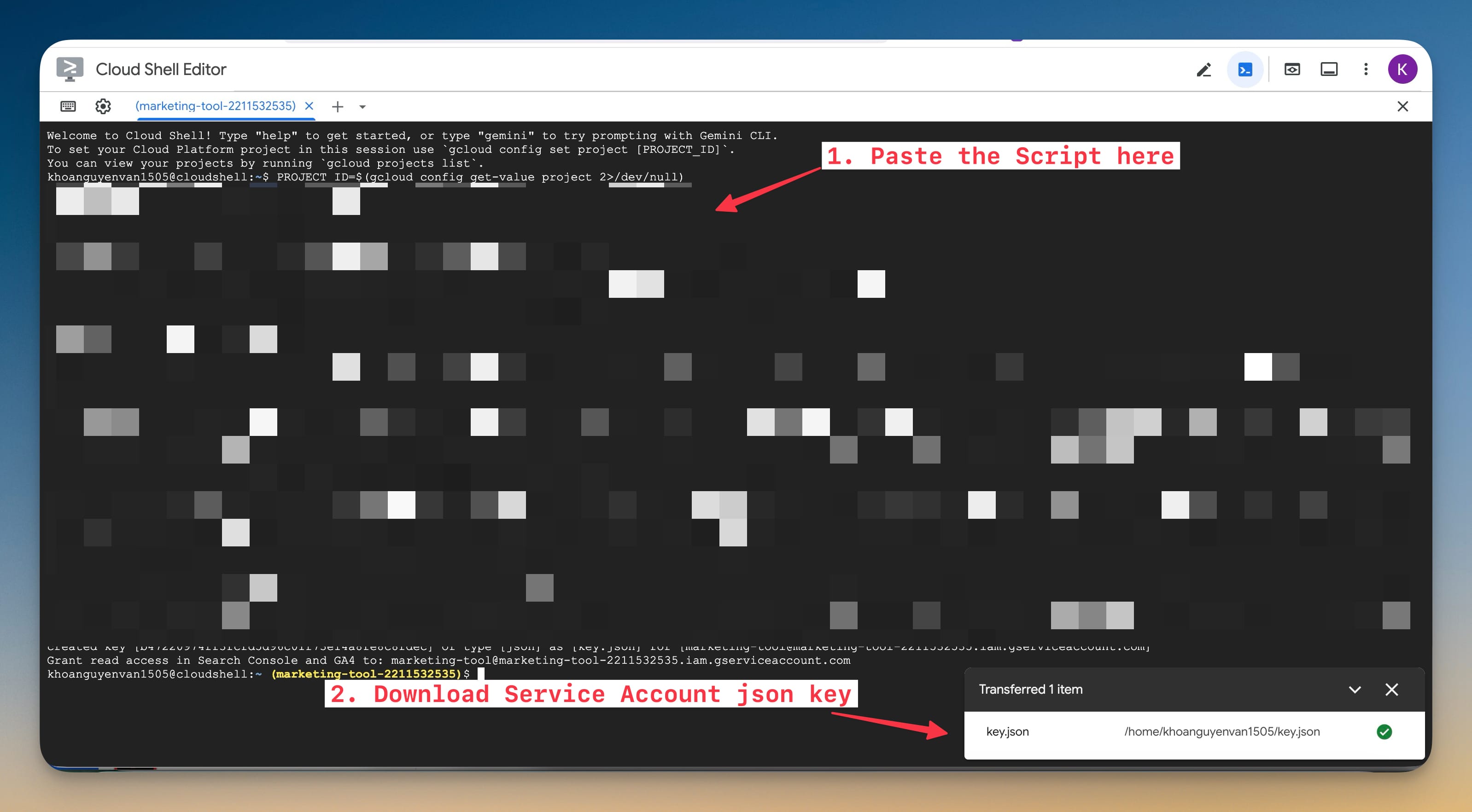
Google Cloud Shell setup for 1MarketingTool service account creation
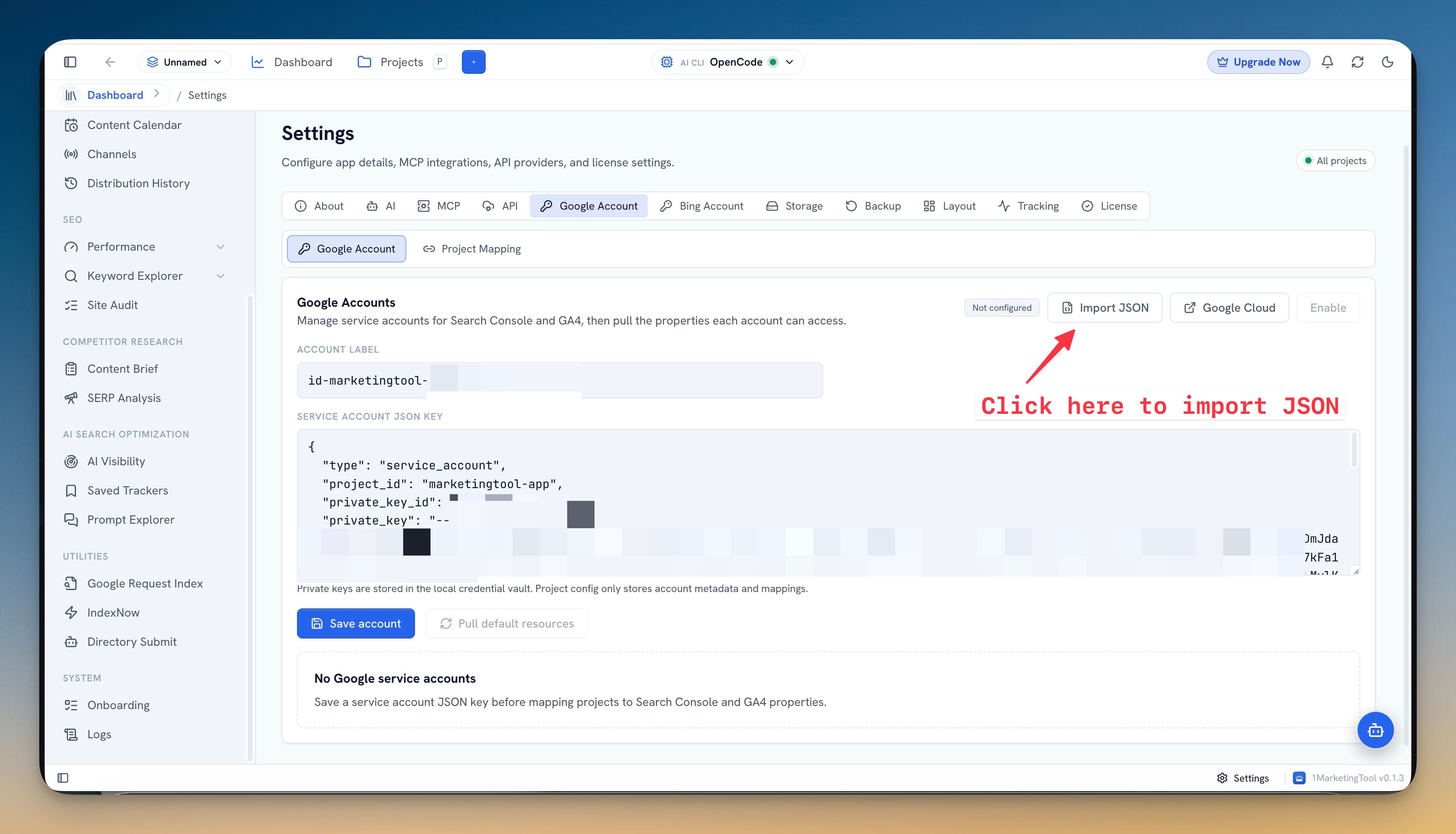
Importing the Google service account JSON key into 1MarketingTool
v0.1.7July 2, 2026

More Reliable Google Project Setup

Improvements

  • More reliable Google project setup. Cloud Shell quick setup now reuses the active Google Cloud project, then an existing 1MarketingTool project, before creating a new one.
  • This keeps reruns cleaner and helps users avoid unnecessary project-quota pressure.
  • Clearer first-run guidance. The setup panel now explains the Cloud Shell terminal and authorization prompts users may see on a new Google account.
  • Better recovery messages. When Google blocks project creation because Cloud terms are not accepted or the project quota is exhausted, the setup output points to the right next action.

Fixes

  • Safer key downloads. Failed setup runs no longer leave an old key.json ready to download as if it were current.
  • More dependable service-account setup. Key creation now waits for the service account to become available and handles reruns where the account already exists.
One-paste Google Cloud Shell setup script for 1MarketingTool
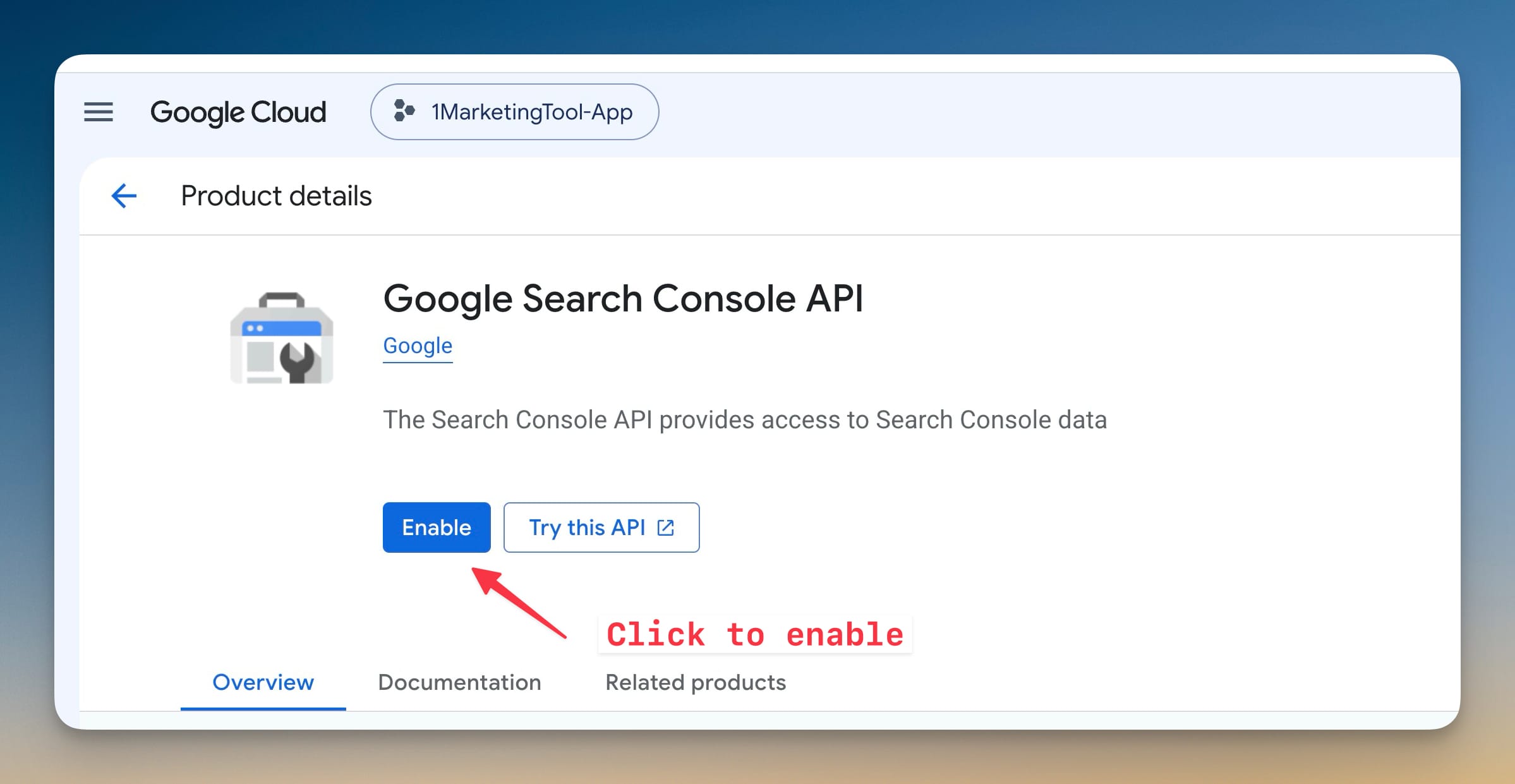
Enabling the Search Console API for 1MarketingTool Google setup
v0.1.6July 2, 2026

Cloud Shell Quick Setup

New features

  • Cloud Shell quick setup. Add a browser-based Google Cloud Shell path for creating the Google service account, enabling the required Search Console, GA4, and Indexing APIs, and downloading the JSON key.
  • The setup guide now gives users a copyable one-paste script before they import the key into 1MarketingTool.

Improvements

  • Smarter Google checklist. The Google setup modal now tracks setup progress across the service account key, API access, property permissions, and the final data pull.
  • Clearer GSC and GA4 recovery. When a pull fails because an API is disabled or access is missing, the app now shows the next action: enable the API, copy the service account email, or open the right Google access screen.
  • Better Google Account settings. Settings now include the same Cloud Shell quick setup path, a tutorial link, tighter toolbar behavior, and an inline JSON import action where users are already editing account details.
1MarketingTool Content Machine overview powered by user-owned AI providers
1MarketingTool AI visibility dashboard using BYOK provider workflows
v0.1.5July 1, 2026

BYOK AI Provider Setup

New features

  • BYOK AI providers. Add direct provider setup for OpenAI, Anthropic, Gemini, Azure OpenAI, OpenRouter, Ollama Cloud, and custom OpenAI-compatible endpoints.
  • Keys are stored in the local credential vault.
  • Users can test a provider, enable it, and choose whether AI tasks use Auto, a specific local CLI, or a specific BYOK provider.
  • Guided setup wizard. Add a step-by-step onboarding flow for AI tools, Google service accounts, Search Console / GA4 sync, publishing channels, and DataForSEO.
  • AI and DataForSEO checks now run live tests from onboarding, so users can confirm setup before relying on a workflow.
  • SEO agent skills installer. Add a settings workflow that installs 1MarketingTool SEO skills into detected local CLI agents.
  • The skill pack covers keyword research, keyword clustering, competitor analysis, content briefs, rank tracking, and SEO coaching through the bundled MCP tools.
  • Bing Account for SEO signals. Add a dedicated Bing Webmaster setup path used by IndexNow history checks and Performance backlinks.
  • IndexNow history can now show Bing index status separately from the original submission result.

Improvements

  • Clearer AI selection. The top bar now exposes the active AI route, available local CLIs, BYOK providers, and image-generation capability in one selector.
  • Better campaign checks. Campaign reviews now adapt to the content type: SEO checks for articles, platform-fit checks for social posts, and pacing checks for video scripts.
  • More useful license prompts. Free-plan limits now open a plan comparison and license entry path for workspace, project, import, and export limits.
  • Faster Google setup. Google service account JSON files can be imported directly, with inline validation before saving.
  • Directory Submit notes. Directory rows now support notes, note search, and clearer done-state controls for manual submissions.
  • Settings cleanup. AI, Bing, MCP, storage, backup, and license settings are easier to scan with focused sections and status labels.

Fixes

  • BYOK logs are labeled correctly. AI logs now identify BYOK calls and make them filterable from the Logs view.
  • IndexNow status is less ambiguous. Submission status and Bing indexing status are separated so a URL can be tracked after the initial ping.
  • Release publishing target fixed. Draft releases now point at the correct public release repository.
1MarketingTool design studio for marketing asset generation
1MarketingTool content calendar for campaign scheduling
v0.1.4July 1, 2026

BYOK AI Provider Setup

New features

  • BYOK AI providers. Add direct provider setup for OpenAI, Anthropic, Gemini, Azure OpenAI, OpenRouter, Ollama Cloud, and custom OpenAI-compatible endpoints.
  • Keys are stored in the local credential vault.
  • Users can test a provider, enable it, and choose whether AI tasks use Auto, a specific local CLI, or a specific BYOK provider.
  • Guided setup wizard. Add a step-by-step onboarding flow for AI tools, Google service accounts, Search Console / GA4 sync, publishing channels, and DataForSEO.
  • AI and DataForSEO checks now run live tests from onboarding, so users can confirm setup before relying on a workflow.
  • SEO agent skills installer. Add a settings workflow that installs 1MarketingTool SEO skills into detected local CLI agents.
  • The skill pack covers keyword research, keyword clustering, competitor analysis, content briefs, rank tracking, and SEO coaching through the bundled MCP tools.
  • Bing Account for SEO signals. Add a dedicated Bing Webmaster setup path used by IndexNow history checks and Performance backlinks.
  • IndexNow history can now show Bing index status separately from the original submission result.

Improvements

  • Clearer AI selection. The top bar now exposes the active AI route, available local CLIs, BYOK providers, and image-generation capability in one selector.
  • Better campaign checks. Campaign reviews now adapt to the content type: SEO checks for articles, platform-fit checks for social posts, and pacing checks for video scripts.
  • More useful license prompts. Free-plan limits now open a plan comparison and license entry path for workspace, project, import, and export limits.
  • Faster Google setup. Google service account JSON files can be imported directly, with inline validation before saving.
  • Directory Submit notes. Directory rows now support notes, note search, and clearer done-state controls for manual submissions.
  • Settings cleanup. AI, Bing, MCP, storage, backup, and license settings are easier to scan with focused sections and status labels.

Fixes

  • BYOK logs are labeled correctly. AI logs now identify BYOK calls and make them filterable from the Logs view.
  • IndexNow status is less ambiguous. Submission status and Bing indexing status are separated so a URL can be tracked after the initial ping.
  • Release publishing target fixed. Draft releases now point at the correct public release repository.