Sep 28, 2026 · 7 min read
Find the people asking for what you sell, while they're still asking
Signalify listens for your keywords on Reddit, X, LinkedIn, Hacker News, Stack Overflow and more, scores every match 0 to 100 with the reasons shown, and drafts a helpful reply you post yourself.
Somewhere right now, someone is typing "any good alternative to Hootsuite for a two-person team?" into Reddit, or asking on Hacker News how other founders get their first users. That is the best lead you will get all week: a person who has already described the problem your product solves, in public, and is waiting for an answer. By the time you find the thread, it is three days old and forty people have replied.
So you try to keep up by hand. You bookmark a few subreddit searches, set up a keyword alert that mostly catches press releases, and check X between meetings. It works for a week, then the tabs pile up and you stop. The threads keep happening. You just are not there for them.
What changed
1MarketingTool 1.4.0 adds Signalify, a new page under Community in the sidebar. Now you can find the people asking for what you sell while they are still asking, without living in a dozen search tabs. It listens for your project's keywords on Reddit, X, LinkedIn, Hacker News, Stack Overflow, Quora, Indie Hackers, Product Hunt, forums and any community domains you add. Every match lands in one inbox with a 0 to 100 score that tells you whether it is worth a reply.

How it works in practice
Tell it what your buyers type
Setup is per project, so each product you market gets its own listening list. On the Setup tab, Listen for takes one phrase per line: the problems, use cases and "alternative to ..." searches people type when they are shopping. If you have already saved competitors on the project, Signalify suggests "name alternative" lines for you. Exclude posts mentioning keeps out the noise, such as job posts or a homonym that shares your keyword.
Below that, Where to listen has a switch per platform, and Other communities takes any extra domains you want watched, one per line. Two settings decide how picky the inbox is. Minimum intent score keeps weak matches out entirely, and Only questions, recommendation requests and complaints skips general discussion threads.
Let signals come to you two ways
Press Scan Now and Signalify searches the sources it can reach without a key: Hacker News, Stack Overflow and Reddit's public search. The browser extension covers the sites that need a login. It opens Reddit, X, LinkedIn and Quora searches in background tabs using the accounts you are already signed in to, so nothing new needs to be connected.
Turn on Capture automatically while I browse and the extension also saves matching posts as you scroll the sites you have enabled. The keyword check happens inside the tab, so the rest of your browsing never leaves the page. Only posts that match your list reach the app.
Setting up the extension is a one-time step. Use Export the extension folder, open the extensions page in Chrome, Brave or Edge, turn on Developer mode, choose Load unpacked and pick the folder. In 1.4.0 you can choose where that folder lives, and the app keeps the files updated on every launch.
Read the score, not the whole internet
The inbox is split into Open, Saved, Replied, Dismissed and All, with a search box and filters for platform, intent and score. Each signal shows its score and a short list under Why it scored, written in plain words:
- Matches "your keyword", and whether the keyword is in the title
- Asking for recommendations, Asking a question or Frustrated with a current option
- Posted 2h ago, because a fresh thread is still being read
- No replies yet or Only 2 replies, because an empty thread is where a good answer gets noticed
- Mentions one of your competitors
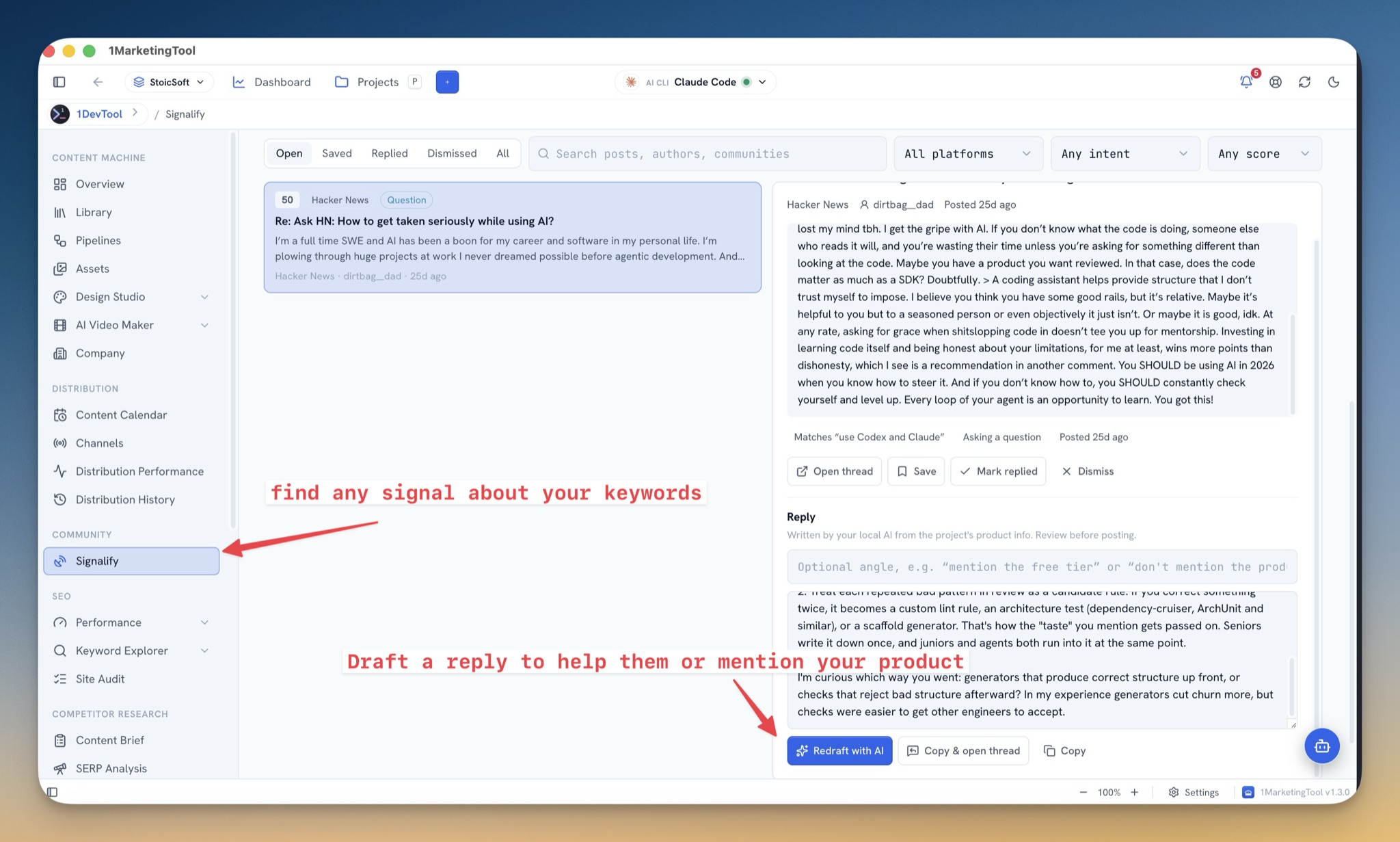
That list is what saves you time. A 50 on a Hacker News question about AI coding workflows tells you why it scored before you open it. A signal at 80 or above also sends an alert, so a hot thread does not wait until the next time you open the page.
Draft a reply, then post it yourself
Open a signal and the full post sits in the inspector with the author, the community and the thread's age. Under it, Draft with AI writes a reply from your project's product information using the AI you already set up in the app. Add an Angle (optional) first, such as "mention the free tier" or "don't mention the product", and press Regenerate until it sounds right.
The drafting rules lean against spam. The reply has to answer the question first and be useful even if your product is never named. It mentions the product at most once, only when it genuinely fits, and says plainly that you work on it. It stays between 60 and 170 words, and under 270 characters on X.
Then you post it. Replies are never posted automatically. Copy & Open Thread puts the draft on your clipboard and opens the post, and Mark Replied moves the signal out of your way. Save Draft keeps a half-finished answer for later.
Keep the people, not just the posts
The People tab collects the authors behind your signals. Filter them, mark someone Shortlisted when they look like a fit, draft an outreach message the same way you draft a reply, and use Copy & Mark Contacted once you have sent it. It is a small CRM for the people who told you they have the problem.
Before vs After
| Before | With Signalify | |
|---|---|---|
| Finding threads | Saved searches on each site, checked by hand | One inbox per project, filled by scans and while you browse |
| Deciding what matters | Open every thread and read it | A 0–100 score with the reasons listed |
| Catching hot threads | Whenever you remember to look | An alert when a signal scores 80 or more |
| Writing the reply | Start from a blank box | A draft from your product info, with an optional angle |
| Posting | Copy, switch tabs, find the thread | Copy & Open Thread, then Mark Replied |
| Following up | A spreadsheet, if anything | People tab with Shortlisted and Contacted |
Who benefits most
Solo founders who know their buyers hang out on Reddit and Hacker News but cannot spend an hour a day searching. Five minutes in the inbox covers what used to take the hour.
Developer-tool teams whose best leads are Stack Overflow questions and "what do you use for X" threads. Those are exactly the posts the question and recommendation scoring pushes to the top.
Anyone marketing more than one product. Each project keeps its own keywords, platforms and threshold, so signals for one product never bury the other.
Also in 1.4.0
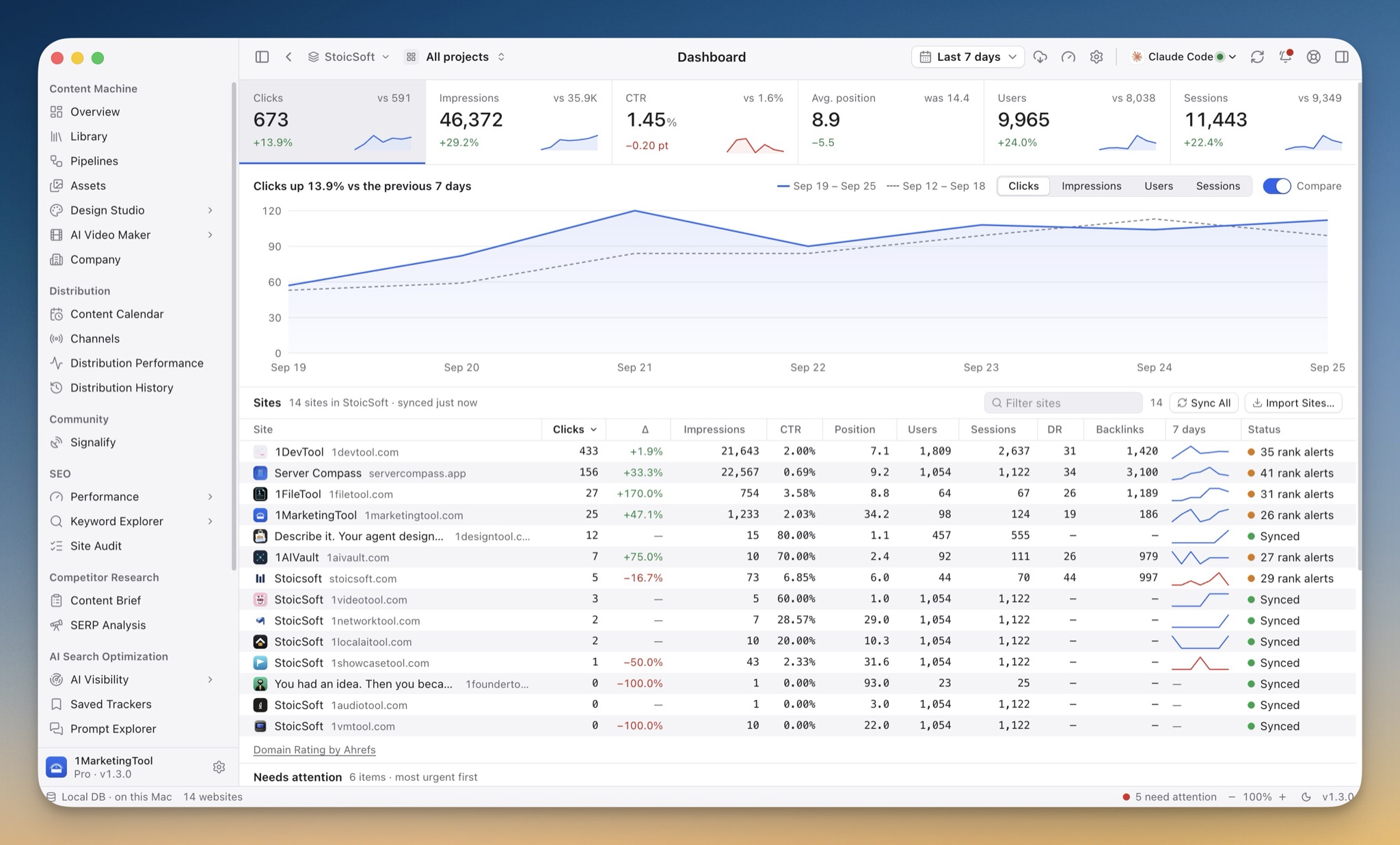
The whole app was rebuilt to look and feel like a native desktop tool. On macOS the window controls sit in a full-height sidebar, a unified toolbar carries the page title, and a slim status bar holds your data location, the running job, zoom, appearance and version. Dashboard, Analytics, Insights, Links and Index now open on flat KPI strips with sparklines and change chips. The Content Library gained a sortable table view with status and channel filters and a one-click CSV export of exactly what you see.
Try it
Update to 1.4.0 from the app, or download it for macOS, Windows or Linux. Open Community → Signalify, add five phrases your buyers would type, and press Scan Now. The first useful thread is usually already out there, waiting for someone to answer it.